ユーザーがコンポーネントをドラッグし、他のコンポーネントにドロップすると、ドロップされたコンポーネントはonDropイベントによって通知されます。onDropイベントはorg.zkoss.ui.event.DropEventのインスタンスです。getDraggedメソッドを呼び出すことより、何がドラッグ(ドロップ) されたかを取得します。
onDropイベントのターゲットはドロップ可能なコンポーネントで、ドラッグされているコンポーネントではありません。
以下は、ユーザーにドラッグアンドドロップによるリスト再配列を可能にしている単純な例です。
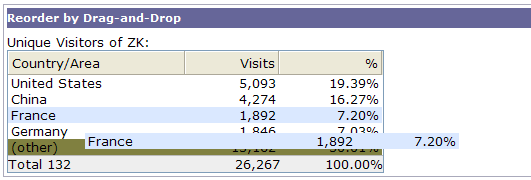
<window title="Reorder by Drag-and-Drop" border="normal">
    Unique Visitors of ZK:
    <listbox id="src" multiple="true" width="300px">
        <listhead>
            <listheader label="Country/Area"/>
            <listheader align="right" label="Visits"/>
            <listheader align="right" label="%"/>
        </listhead>
        <listitem draggable="true" droppable="true" onDrop="move(event.dragged)">
            <listcell label="United States"/>
            <listcell label="5,093"/>
            <listcell label="19.39%"/>
        </listitem>
        <listitem draggable="true" droppable="true" onDrop="move(event.dragged)">
            <listcell label="China"/>
            <listcell label="4,274"/>
            <listcell label="16.27%"/>
        </listitem>
        <listitem draggable="true" droppable="true" onDrop="move(event.dragged)">
            <listcell label="France"/>
            <listcell label="1,892"/>
            <listcell label="7.20%"/>
        </listitem>
        <listitem draggable="true" droppable="true" onDrop="move(event.dragged)">
            <listcell label="Germany"/>
            <listcell label="1,846"/>
            <listcell label="7.03%"/>
        </listitem>
        <listitem draggable="true" droppable="true" onDrop="move(event.dragged)">
            <listcell label="(other)"/>
            <listcell label="13,162"/>
            <listcell label="50.01%"/>
        </listitem>
        <listfoot>
            <listfooter label="Total 132"/>
            <listfooter label="26,267"/>
            <listfooter label="100.00%"/>
        </listfoot>
    </listbox>
    <zscript>
    void move(Component dragged) {
        self.parent.insertBefore(dragged, self);
    }
    </zscript>
</window>